

If you want to add a new Wi-Fi network, and the module can select automatically the best signal quality network, you can proceed as following:
This method consist of send the new Wi-Fi network’s name and password online (at least the Wi-Fi network used at the registration process should have internet access). The new Wi-Fi network should be
- Step1: Go to https://affcity.com then open Settings Tab of your module.
- Step2: Click on WiFi Config to expand the tab.
- Step 3: Type in your new Wi-Fi network name and password, then wait the module to connect to it
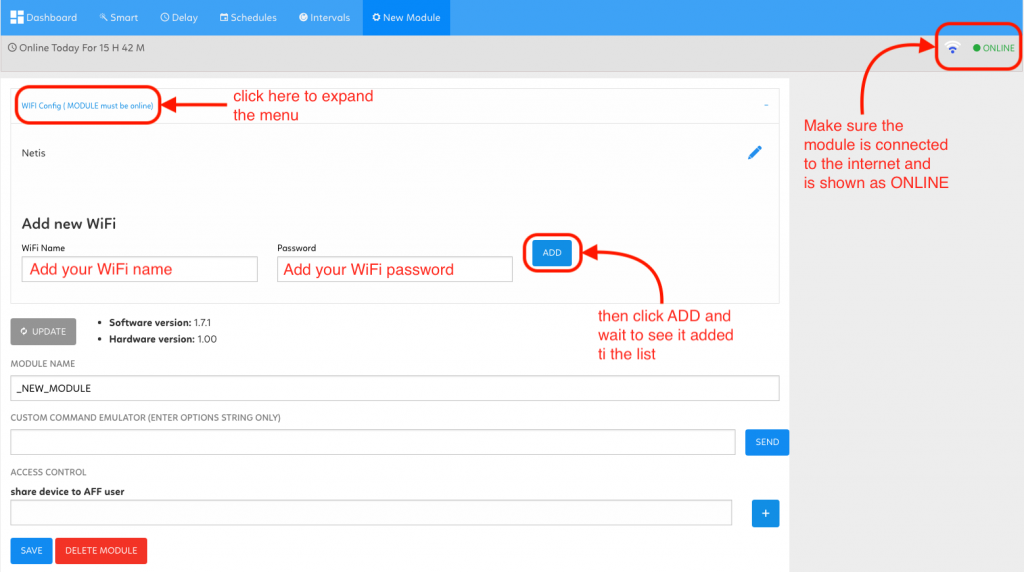
- Step 4: Once the connection to the new Wi-Fi network is established successfully, the new network name will be listed in the network list.
If you faced any issue with these steps, please don’t hesitate to Contact us and describe your issue, then our support team will help you to solve it easily!